

My membership payment failed
Your membership or subscription renewal did not go through. Here is what that means, what you keep, and how to update your card so the next try succeeds.
If your membership or subscription renewal did not go through, update your card in the app. The club tries the payment again automatically. (About 2 minutes. You need the OpenCourt app and a card to add.)
What happened
Your card could not be charged for the renewal. Your membership or subscription is now Past Due. You get an email with the subject Payment failed for your subscription at (your club), and a notification in the app.
While it is Past Due, you keep everything: your member prices, your booking passes, and your family's benefits. The club tries your card again over the next few days.
If no payment goes through, your membership or subscription ends. Your member prices and passes from it stop.
Update your card
- Open the OpenCourt app and go to your profile.
- Tap Memberships (or Subscriptions) and open the one marked Past Due.
- Under Payment method, tap Change (or Set card if no card is saved).
- Choose a saved card, or add a new one.
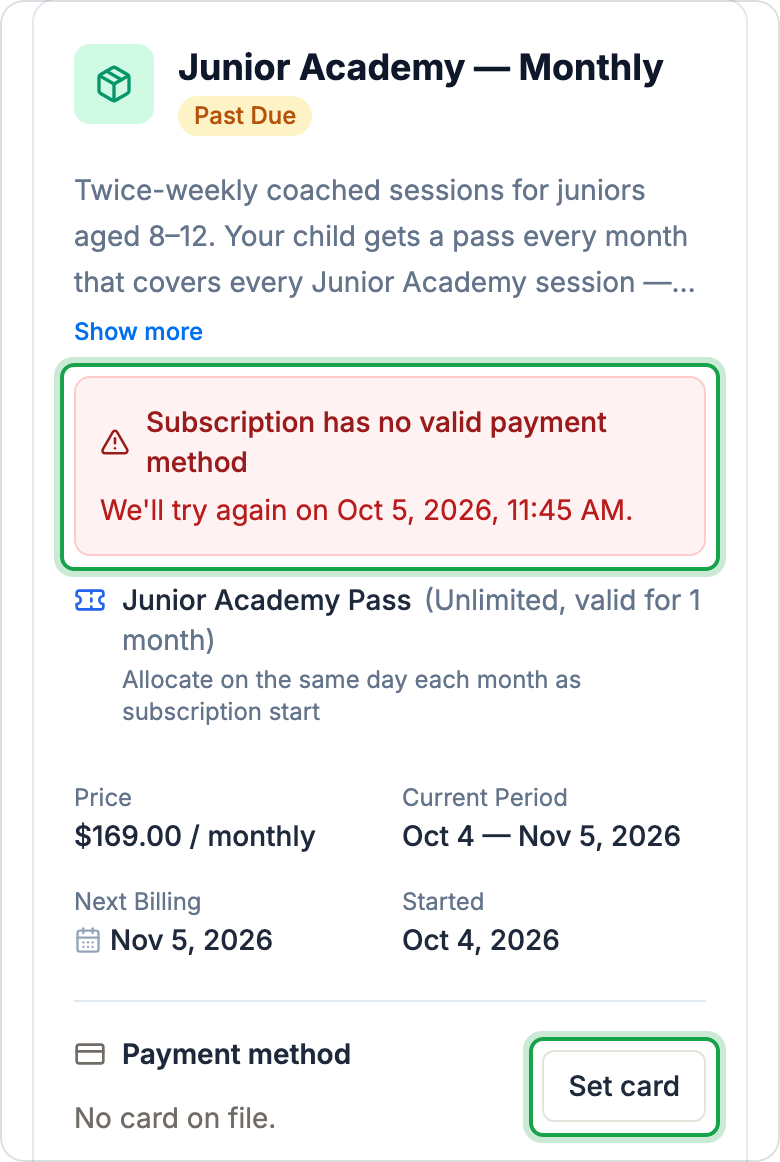
The red notice on that page shows why the payment failed and when the next try is. The new card is used at that next try, not at once.
If something goes wrong
- The card was declined again. Check with your bank, or add a different card. A bank can block a card for renewals, for example after it is reported lost.
- Your bank asks you to approve the payment. The payment shows Action Needed. Follow your bank's prompt.
- You want to pay right now, or your membership has ended. Contact your club. They can take the payment or sign you up again.