

Monitor and troubleshoot
Check your conversion tracking health inside OpenCourt and fix the most common problems — missing test events, failing sends, and numbers that look off.
Everything you need to keep conversion tracking healthy lives inside OpenCourt — no log-diving in Meta or Google required.
Your dashboard in OpenCourt
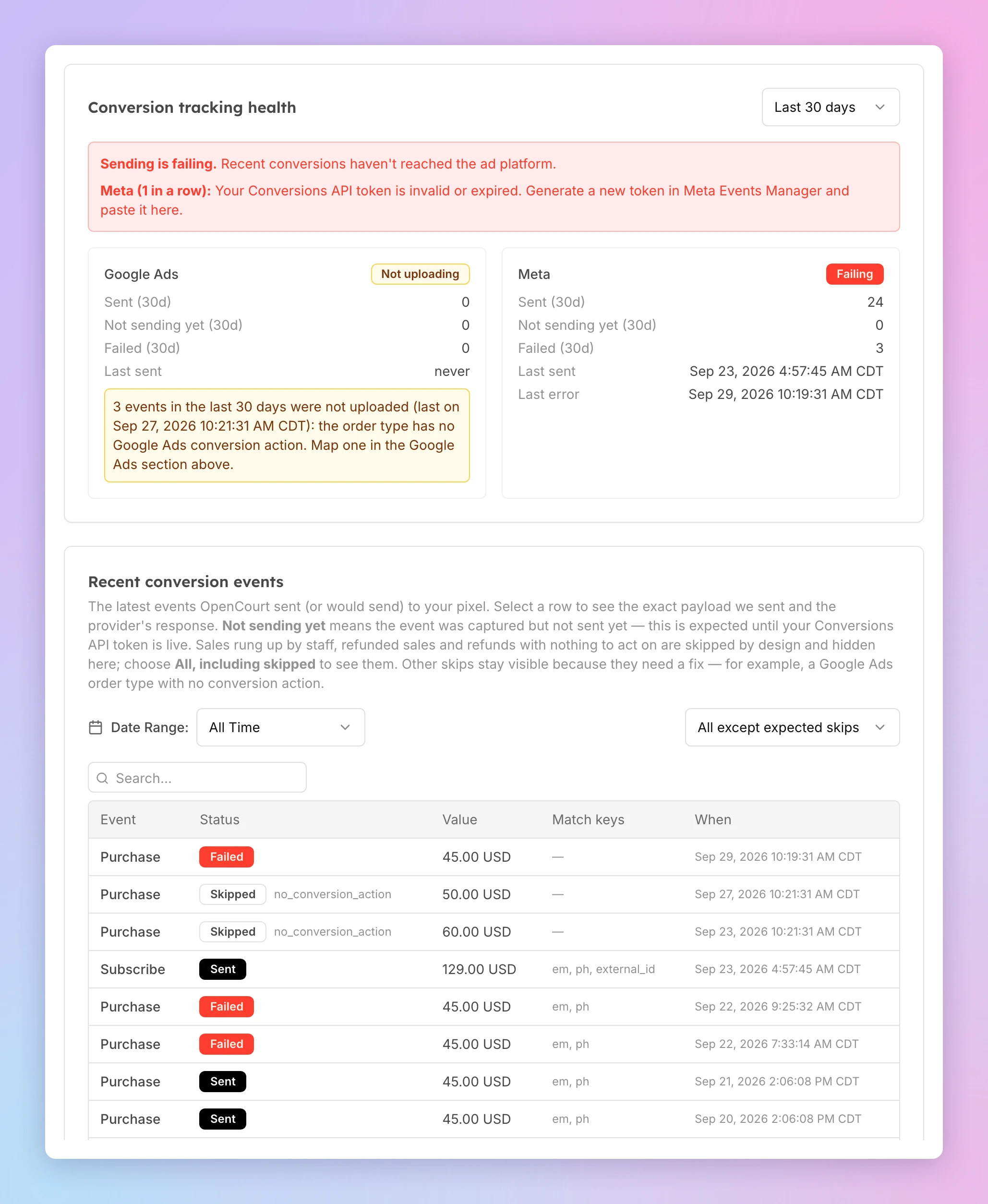
Open Admin → Settings → Ad and Conversion Tracking. The Conversion tracking health card has one panel per connected provider. A provider you disconnect leaves the card; its events stay in the table below. The card shows:
- Sent / Failed — how many events went out and how many failed. Choose the period in the top-right corner of the card: the last 7, 30 or 90 days. It starts at 30 days.
- Last sent and Last error — when the most recent event went out, and when the most recent one failed.
- A red "Sending is failing" banner above the panels when recent sends are failing, with the step that fixes it for each provider.
- An amber line when events in the period were not sent because of something you can fix — for example "12 events in the last 30 days were not uploaded (last on Sep 20, 2026 2:14:05 PM CDT): the order type has no Google Ads conversion action". The line says what to change. It counts the whole period, so it stays after you fix the problem until the period moves past the last skipped event. If the "last on" date is before your fix, the problem is solved. To clear it sooner, choose a shorter period.
- A Not uploading badge when a provider has never sent an event and events in the period were skipped for a reason you can fix. The amber line under it says what to change.
- No banner, no amber line, and Sent is climbing? You're healthy.
Below that, the Recent conversion events table lists the events OpenCourt captured, newest first. Use Load more to go further back — the full history is there. Two filters narrow it down:
- Date range — this week, this month, last month, the last 3 months, this year, or all time. Dates follow your club's timezone.
- Status — by default the table shows all except expected skips. It hides only the events that are skipped by design: sales rung up by staff, sales whose money went back before they were sent, refunds with nothing for you to act on, and (on older rows) sales that captured $0. Every other skip stays visible, because it means something needs fixing. Choose Failed to see only the failures, or All, including skipped to see every row.
Click any row to open a detail slideout with the exact request and response payload and a Copy button. OpenCourt keeps these payloads for 180 days. After that the row stays in the table, with its status and value, but the payload is removed. A failed event keeps a short version of the platform's answer, so it can still say why it failed.
Status glossary
| Status | Meaning |
|---|---|
| Sent | The event was delivered and the platform accepted it. |
| Failed | Delivery was attempted but the platform rejected it — see the slideout for the response. On a Refund row it can also mean the refund is still on its way, or could not be sent (for example, tracking was turned off or the Meta token was removed). The slideout's note says which. |
| Not sending yet | The event was captured but not sent yet. This is normal, not an error — it's expected until your Conversions API token is live. Once your token is saved and working, new events send for real. |
| Skipped | OpenCourt did not send the event. The reason shows next to the status. admin_pos (a sale rung up by staff), refunded (the money went back before the sale was sent), already_reversed (the refund was already reported), purchase_not_delivered (the sale had not reached Meta yet — OpenCourt retries the refund on its own) and, on older rows, zero_value (a $0 sale) are expected and hidden by default. Any other reason — such as no_conversion_action — means something needs fixing and stays visible. |
Symptom → fix
Test events don't appear in Meta
Meta's Test Events tab is a live listener — open it first, keep it open, then send, and allow up to a minute. And the test code in OpenCourt must match the one in Meta's tab exactly — a wrong code still reports "Sent" but lands the events in a bucket you can't see. Full walkthrough: Send a test event.
The red "Sending is failing" banner is up
The banner names the fix for each provider that is failing. The most common ones:
- Meta — your Conversions API token is invalid or expired. Generate a new token in Meta and paste it into OpenCourt — the steps are in Set up Meta conversion tracking.
- Google Ads — turn on enhanced conversions. In Google Ads, go to Goals → Conversions → Settings, accept the customer data terms, and turn on enhanced conversions. Then click Check setup on the Google Ads card to confirm.
- Google Ads — reconnect. OpenCourt lost its permission to upload: the Google account that connected lost access to your Google Ads account, or someone removed OpenCourt's access in that Google account's settings. Click Reconnect Google Ads and sign in with a Google account that has access — the steps are in Set up Google Ads conversion tracking.
Sales that failed before you fixed the problem are not sent again automatically. If you want them re-sent, email support@getopencourt.com — the sooner the better. Click any failed row in Recent conversion events to see the fix again and the platform's full response.
A Custom Conversion stopped counting bookings
Court, bay and lane bookings used to report as content_category event. They now report as space,
and the old court value is gone. If you built a Custom Conversion on content_category equals event, it
still counts league, clinic, tournament and open-play registrations — but no longer counts bookings. Add a
second Custom Conversion on content_category equals space to count them again. If you want one
conversion covering both, build the rule so it matches event or space — not a rule that requires
both, which nothing can satisfy. The recipe is in
Understand your conversion data.
Expect a step change in volume around the release date. That is the rename, not a drop in real bookings.
Google Ads: bookings stopped uploading
Different symptom, worse outcome. Google Ads credits a sale to the conversion action you mapped against its
order type. If your map still has a court row, nothing will ever match it — move that resource name to the
space row in Settings → Ad and Conversion Tracking → Google Ads. And make sure the default row is
filled: an order type with no mapping, and any charge OpenCourt cannot classify, falls back to default.
With default empty those conversions are never uploaded. They show in the events table as Skipped with
the reason no_conversion_action.
A sale is missing
Was it rung up by staff at the front desk (an admin or POS sale)? Those are excluded by design — ad platforms only need the sales your ads could have driven, and a front-desk sale isn't one. They show as Skipped; set the table's status filter to Skipped to find one. See What OpenCourt sends — and what it never sends.
Two events for one membership sale
Expected. A new membership fires Purchase + Subscribe — Meta uses one for revenue and one for subscription optimization. See Understand your conversion data.
Value looks lower than the price
Also by design: OpenCourt reports net cash captured, not the list price. Discounts, credits, and partial payments all reduce the reported value — so your ad platforms optimize toward real revenue. See What OpenCourt sends — and what it never sends.
Reported revenue is higher than what you actually kept
Check Meta for Refund events. Meta keeps the original purchase value after a refund; OpenCourt sends a
separate Refund event worth the amount returned. Subtract it with a custom metric in Ads Manager. A refund
made more than 180 days after the sale is not sent, and gets no row in the events table, because OpenCourt no
longer keeps what it reported for that sale. Google Ads
and GA4 are never updated for a refund, and a refund to account credit is not sent anywhere — reconcile those
against OpenCourt's own reports. See
What OpenCourt sends — and what it never sends.
Each refund or lost chargeback gets its own row in the events table: Refund, then Refund #2, and so on. A
row Skipped as already_reversed means Meta already had the right total, so nothing more was sent. One
skipped as purchase_not_delivered means the original sale had not reached Meta yet; OpenCourt retries it
automatically once the sale arrives.
A free booking shows up as a Lead — or not at all
Expected. A sale that captures $0 — fully covered by a pass, account credit, or a 100% promo code, or a
free event — reports a Lead with a value of 0, never a Purchase, and only when it is the customer's first
order at your club. A member's or returning customer's free booking sends nothing. In Google Ads a Lead is sent
only when the free_booking row is mapped. See
Free bookings are reported as a Lead.
A sale from the app isn't credited to an ad
In-app purchases are reported server-side, so the revenue arrives — but the browser pixel does not run inside the OpenCourt app, so those sales often land without a link to a specific ad. Send your ad traffic to the web booking pages instead. See Purchases made in the OpenCourt app.
Understand your conversion data in Meta
How to read OpenCourt's Purchase and Subscribe events in Meta, break out sale types with content_category, and set realistic attribution expectations.
How access controls work in OpenCourt (overview)
How OpenCourt connects to your club's smart locks for per-booking door codes and in-app unlocking — and how to choose between Seam, RemoteLock, Rhombus, and UniFi Access.