

Send a test event
Use OpenCourt's built-in test console to prove your Meta connection works before real ad money depends on it.
Send a fake purchase from OpenCourt to Meta and watch it arrive — so you know the connection works before real ad money depends on it. (About 5 minutes.)
What you'll need: your Dataset ID and Conversions API token already saved in OpenCourt (from Set up Meta conversion tracking), plus access to your club's Meta Events Manager.
This test console is Meta-only. GA4 verifies through its own Realtime and DebugView reports, and Google Ads through each conversion action's diagnostics — no OpenCourt test console needed for those.
Step 1 — Get your test event code from Meta
- In Meta Events Manager, open your dataset and go to the Test Events tab.
- Select the channel Website — the tab shows a
test_event_code(something likeTEST12345). - Copy it.
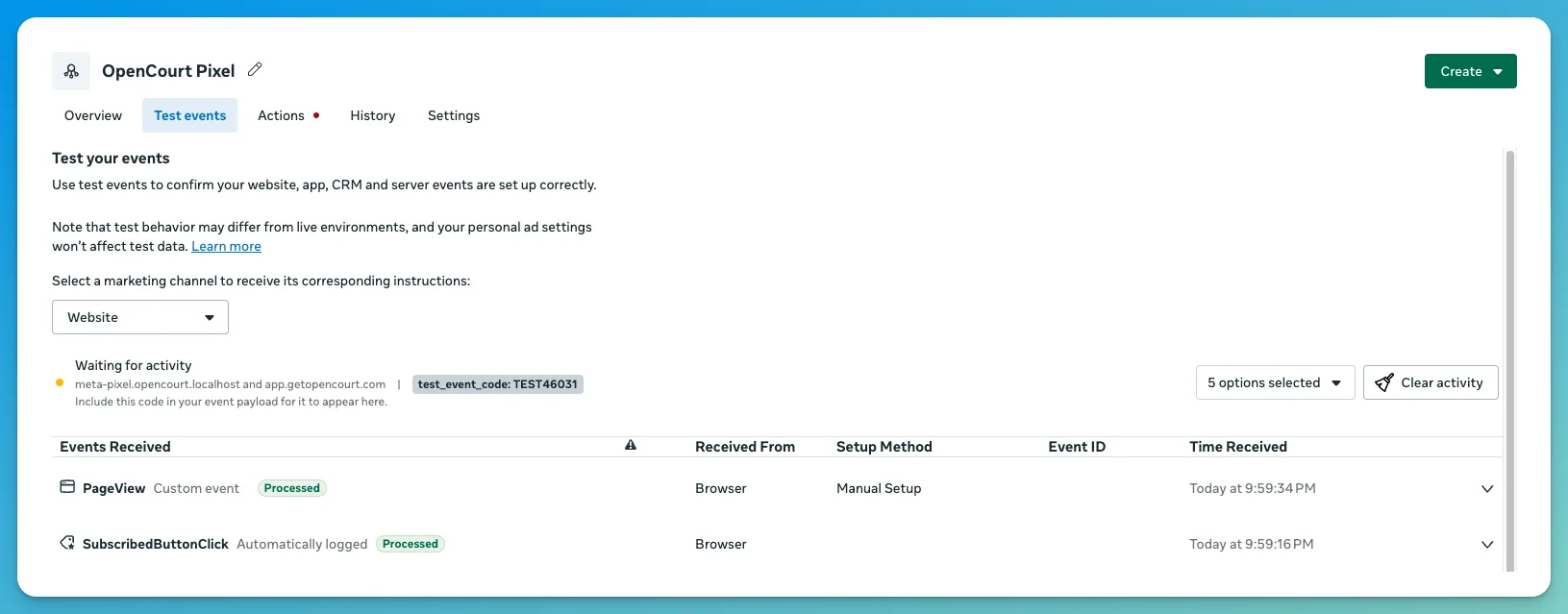
- In OpenCourt → Admin → Settings → Ad and Conversion Tracking, paste the code into the Meta card's Test event code field and click Save.
Step 2 — Send and watch
- Open Meta's Test Events tab (Events Manager → your dataset → Test Events → channel Website) and keep it open.
- In OpenCourt, go to the Meta card's Send a test event area, pick a scenario from the dropdown, and click Send test event. (The View in Meta Events Manager link next to the button jumps you straight to the right place in Meta.)
- Watch the Test Events tab — your events should appear within about a minute, listed under your test code.
OpenCourt reports honestly after sending — something like: "Sent 2 events to Meta with test code TEST12345. Meta accepted them — that doesn't mean they're visible yet. Open your Meta Events Manager → Test Events tab and check they appear under that same code." "Accepted" only means Meta received the request — Meta counts events as received whether or not the code matched — so seeing them in the Test Events tab is the actual proof.
What each scenario sends
| Scenario | Events fired |
|---|---|
| Membership purchase | Purchase + Subscribe — you'll see two events; this is correct. See Understand your conversion data. |
| Presale membership | Purchase only — a deposit is not yet a recurring membership |
| Pass package | Purchase |
| Subscription / package | Purchase + Subscribe |
| Product purchase | Purchase |
| Space booking (host) | Purchase |
| Join a booking (Open Game) | Purchase |
| Join an event | Purchase |
| League registration | Purchase |
| Free booking (Lead) | Lead only — value 0, never a Purchase. A real free order sends it only for a new customer. See Free bookings are reported as a Lead. |
| Refund (reverses a sale) | Refund only — worth the amount returned (here $10 of a $24 booking), not the sale. It is what OpenCourt sends Meta when a sale is refunded or a chargeback is lost. |
Nothing appeared?
Head to Monitor and troubleshoot — it covers the two usual suspects (tab not open first, code mismatch) and everything else.
Set up Google Ads conversion tracking
Connect your Google Ads account so OpenCourt reports real sales as offline conversions Google can optimize toward.
What OpenCourt sends to Meta and Google — and what it never sends
A plain-English breakdown of the conversion data OpenCourt shares with ad platforms, how it protects your customers' privacy, and what stays private.