

Understanding the Customers & Memberships report
What each customer booked, played and bought in a period, and how your memberships are doing: members, MRR, starts, cancellations and churn.
The Customers & Memberships report shows what each customer booked, played and bought in a period, and how your memberships are doing. You find it under Reports → Customers & Memberships.
Two tabs, one date range
The report has two tabs:
- Customers — one row per customer, with their membership and what they did in the period.
- Membership health — how many members you have, what they bring in each month, and how many memberships started and were canceled.
The date range at the top applies to both tabs. When you switch tabs, the range stays the same. Some figures are about today, not the period. Each tile says which: today or in the period.
The Customers tab
What the tiles at the top mean
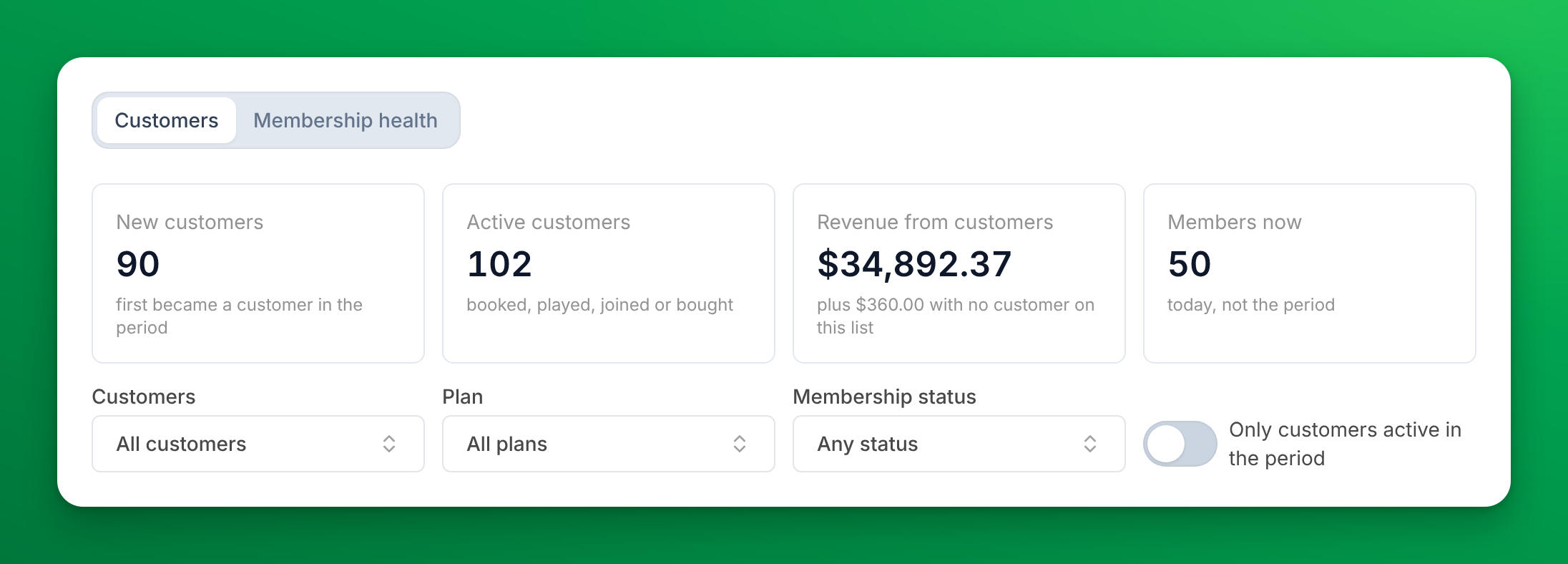
| Tile | What it counts |
|---|---|
| New customers | Customers who first became a customer of your club in the period. |
| Active customers | Customers who made a booking, played in one, joined an event or bought something in the period. |
| Net sales from customers or Revenue from customers | The sales of the customers on the list in the period. See the sales column. |
| Members now | Customers who hold a membership today. The date range does not change it. |
The first three tiles follow your filters. Members now always counts the whole club.
The sales tile can show a second line: plus $360.00 with no customer on this list. That is money from sales that do not belong to a customer on the list, such as a walk-in sale at the front desk with no customer attached. When the column says Net sales, add the two amounts and you get the Revenue Report's Net Sales for the same days. The line shows only when no filter or search is on.
Filter the list
- Customers — Members (an active, past due or frozen membership), Non-members (no membership, or one that has not started yet), Former members and Archived. With nothing picked, the list shows all of them.
- Plan — customers who hold one of the plans you pick today. Pick No membership to see the customers who hold none.
- Membership status — customers with a membership that is Active, Trial, Past due, Frozen or a Family member seat.
- Only customers active in the period — hides the customers who did nothing in the period: no booking, no event and no sale.
- Search — finds a customer by name or email.
You can pick more than one value in each filter. The filters, the sort and the page are kept in the page's web address, so you can bookmark a view or send it to a colleague.
What each column means
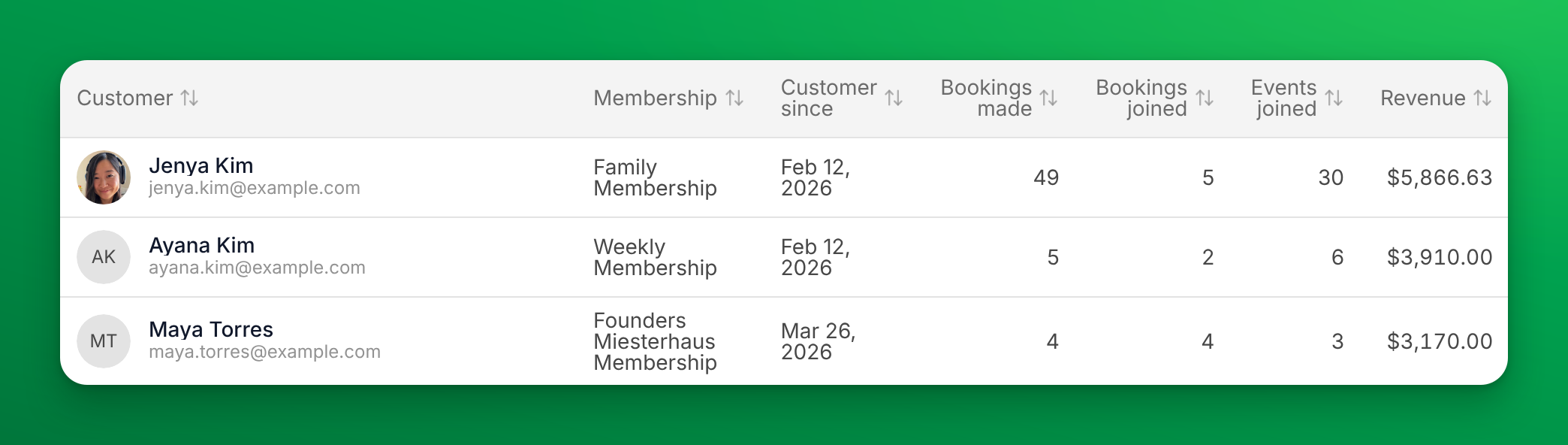
| Column | What it means |
|---|---|
| Customer | The customer's name and email. Click it to open their profile. |
| Membership | The memberships they hold today, with a badge for Family member, Frozen, Trial or Past due. A customer without one shows Non-member, Former member or Archived. |
| Customer since | When they first became a customer of your club. |
| Bookings made | Court bookings the customer made themselves in the period. |
| Bookings joined | Court bookings someone else made that the customer played in. |
| Events joined | Clinics, open play, leagues, tournaments and other events the customer joined. |
| Net sales or Revenue | What the customer bought in the period, after refunds. |
| Next billing | When each membership bills next, No renewal, or After freeze ends. |
On a smaller screen, some columns are hidden. On a phone, the membership shows under the customer's name. The export always has every column.
Click a column header to sort by it. The list opens sorted by sales, highest first.
How bookings and events are counted
- A booking or an event counts in the period when it takes place, not when someone booked it.
- It counts only once it has started. A booking for next week is not in this month's count until next week.
- An event with several sessions, such as a weekly league, counts once in each period where one of its sessions took place.
So a customer who books a court today for next Saturday shows 0 bookings made until Saturday.
Why the sales column says Net sales or Revenue
The sales figures follow the rules of the Revenue Report for the same days. The name depends on how your club's reports calculate sales for the period you picked:
- Net sales — the Revenue Report's Net Sales, split by customer.
- Revenue — what the club keeps: the customer's sales after sales tax and OpenCourt fees, with refunded items taken out on the day of the sale. This older calculation has no exact match on the Revenue Report.
The tile and the export use the same name as the column.
If a note above the tiles says that figures before a month use the previous method, the period starts before your club moved to the new calculation. Pick dates from that month on to see the new figures. For which day a sale counts on and how refunds, club credit and gift cards are treated, see How OpenCourt calculates your sales numbers.
Export the list
Click Export N customers (for example, Export 48 customers) to download a CSV file. The file has:
- Every customer that matches your filters and search, on every page, not only the page you see.
- The rows in the order you sorted the table.
- Every column, plus the customer's Status and the Currency.
- A last row, Sales with no customer on this list, when no filter or search is on. When the column says Net sales, that row makes the column add up to the Revenue Report's Net Sales for the same days.
The Membership health tab
The Membership health tab counts memberships, not customers. A customer with two memberships counts twice. Only Members now and Frozen now count customers.
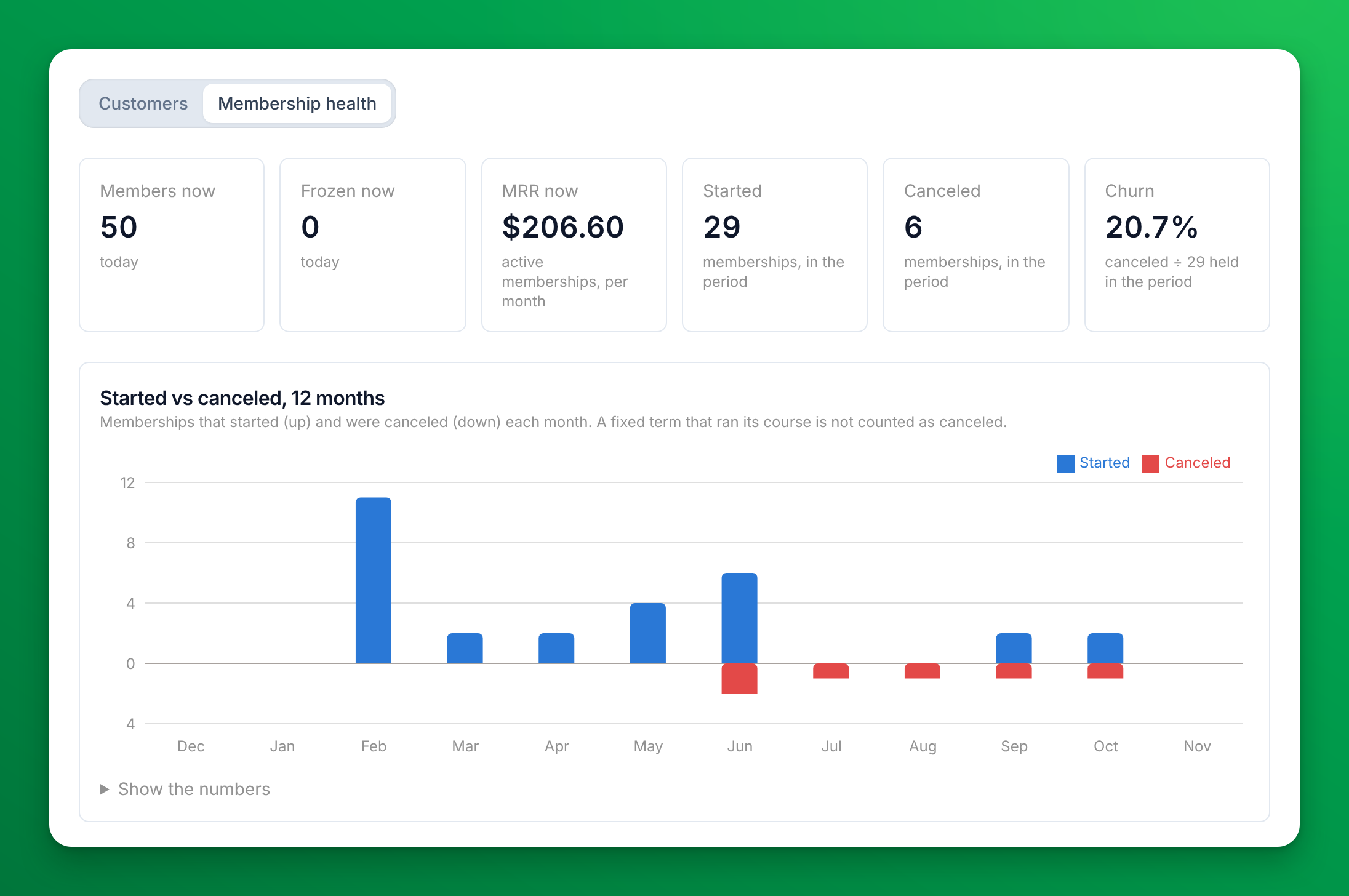
What the tiles mean
| Tile | What it counts |
|---|---|
| Members now | Customers who hold a membership today. |
| Frozen now | Customers whose membership is frozen today. If some memberships are past due, the tile says how many. |
| MRR now | Monthly recurring revenue: what your active memberships bill per month, today. A fixed-term membership adds nothing. |
| Started | Memberships that started in the period. |
| Canceled | Memberships that ended in the period. A fixed term that ran its course is not counted. |
| Churn | Canceled ÷ the memberships held at any time in the period (held when the period started, plus the ones that started in it). |
A membership counts as canceled on the day it ends, not on the day someone asks to cancel it. A fixed-term membership that reaches its end date is a completed term, not churn, so it is not in Canceled or Churn.
Started vs canceled, 12 months
The chart shows the 12 months that end with the last month of your date range. Blue bars go up for memberships that started in each month. Red bars go down for memberships that were canceled. Hover a month to see how many memberships were held at the end of it.
Click Show the numbers to see the same months as a table: Started, Canceled and Held at month end.
By plan
By plan splits the figures by membership plan: Held now, Frozen now and MRR now for today, and Started and Canceled for the period.
Ended in this period: your win-back list
Ended in this period lists every membership that ended in the period, newest first. Use it to contact former members and invite them back. Click a name to open the customer's profile.
| Column | What it means |
|---|---|
| Customer | Who held the membership. |
| Plan | The membership plan. |
| Ended | The day the membership ended. |
| Why | Canceled by the customer, Canceled by staff, Payment failed, Fixed term ended or Not recorded. |
| Member for | How long the membership lasted. |
This list includes fixed terms that ended. That is why it can have more rows than the Canceled tile.
If a number looks wrong
- Bookings made is 0 for a customer who booked this week. The booking has not started yet. Bookings count by the date they take place, once they have started.
- The sales tile is lower than the Revenue Report. Sales with no customer on the list are not in the tile. With no filter on, the tile shows them on its second line. Add the two amounts. This matches the Revenue Report exactly only when the column says Net sales: see the sales column.
- Members now does not change when I filter or pick another period. That is expected. It counts the whole club, today.
- Members now on the Membership health tab is lower than the sum of Held now in By plan. By plan counts memberships. A customer with two memberships counts once in Members now and twice in By plan.
- Ended in this period has more rows than Canceled. The list includes fixed terms that ran their course. Canceled leaves them out.
- Churn shows a dash. No membership was held in the period, so there is nothing to divide by.
- The export has no "Sales with no customer on this list" row. The row appears only when no filter or search is on, and only when there were such sales.
Related
Understanding the Event Participation report
How full your events were: registrations against capacity for each event, which events have happened, and how to see the ones still ahead.
Branded App
Set up and maintain your company's own branded app — also known as a white-label app — on the App Store and Google Play.