

Connect OpenCourt to Zapier
Send new customers, memberships, bookings, signups, payments and refunds from OpenCourt to Google Sheets, your CRM, email tools and thousands of other apps with Zapier.
Connect your club to Zapier, so a new booking, a membership or a payment in OpenCourt can add a spreadsheet row, update a contact in your CRM or send an email — with no code. (About 10 minutes. You need a Zapier account and the OpenCourt API page in your settings.)
Before you begin
- A Zapier account.
- The accepted Zapier invitation to the OpenCourt app (see above).
- An API key for Zapier, which you create in the first step below. How keys work: Manage API keys, webhooks and API versions.
Create a key for Zapier
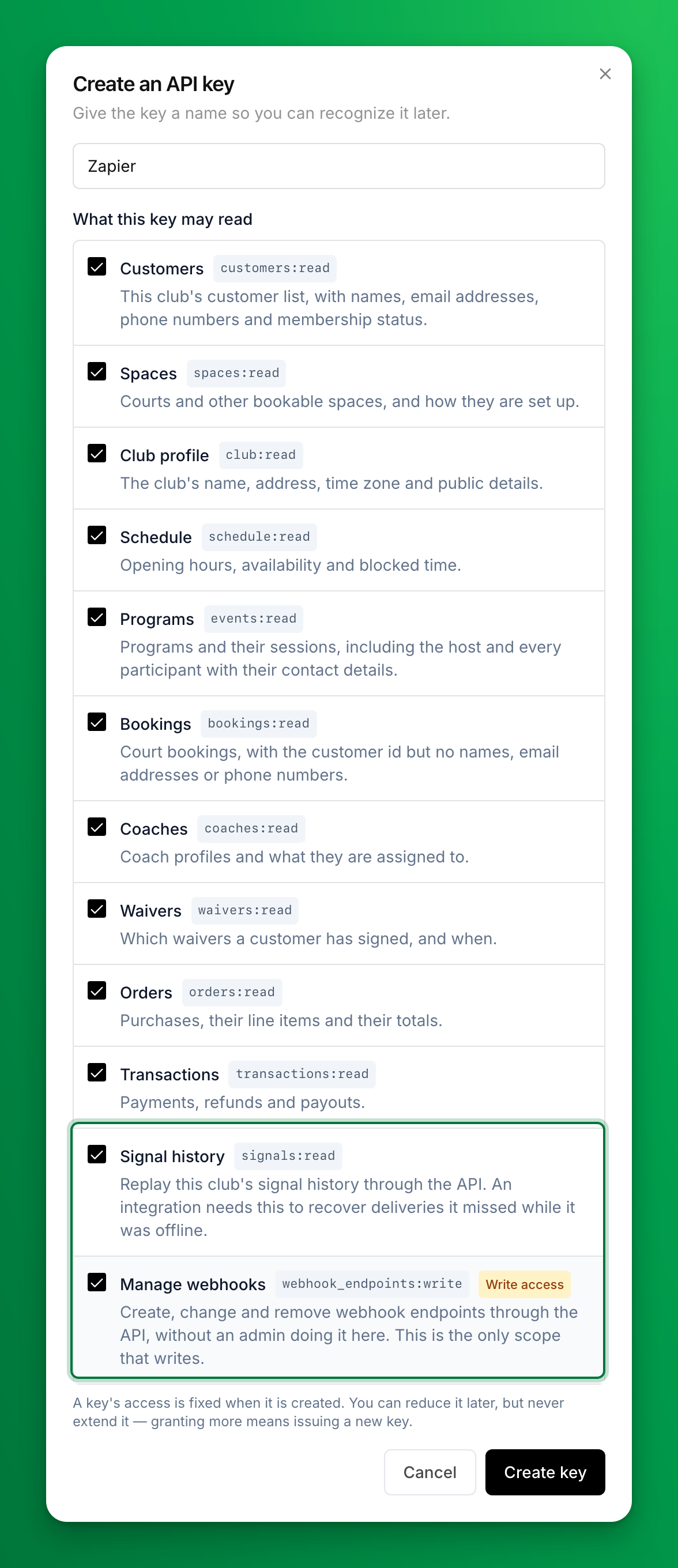
- Go to Settings → OpenCourt API → Keys and click Create API key.
- Name it Zapier.
- Under What this key may read, keep the access that is ticked already, and also tick Signal history and Manage webhooks. Zapier needs both, and neither is ticked for you.
- Click Create key, then copy the key from API key created.
Connect the key in Zapier
- In Zapier, start a new Zap and pick OpenCourt as the trigger app.
- Pick a trigger, for example New Booking.
- When Zapier asks you to sign in, paste the key into OpenCourt API key.
- Zapier shows your club's name on the connection. If it shows another club, you pasted another club's key.
- Click Test trigger. Zapier shows your club's most recent records of that kind, named after the trigger: Booking A, Booking B and so on. Click one to see which it is. Its name, the readable times and amounts, and the customer are at the top.
From then on, the Zap runs within moments of each change in OpenCourt.
What can start a Zap?
| Group | Triggers |
|---|---|
| Customers | New Customer, Updated Customer, Archived Customer |
| Memberships | New Membership, Updated Membership, Renewed Membership, Membership Past Due, Canceled Membership, Expired Membership |
| Court bookings | New Booking, Updated Booking, Canceled Booking |
| Events and programs | New Event, Updated Event |
| Event signups | New Event Signup, Event Signup Canceled, Participant Checked In |
| Money | Order Paid, Order Refunded |
Two searches find a customer for a later step: Find Customer by email address, and Find Customer by ID with the Customer ID from any trigger.
What does each record hold?
- The customer's name, email and phone, under Customer, on every booking, membership, signup and order. Zapier reads them when the Zap runs, so they are the customer's current details. Customer is empty for a guest who has no customer record at your club, and when the key cannot read customers.
- Readable copies next to the raw values. Money shows as $25.00 in your club's currency, and a booking's start and end show in your club's own time, such as 2026-10-29 1:00 PM. Use these in a spreadsheet or an email.
- What was bought. Order Paid lists each line of the order, with the booking or event it paid for.
- The refund that just happened. Order Refunded fires once for each refund — to a card, in cash, as club credit, or a card dispute your club lost — with Refund Amount and Refund Method, and the order under Order. Order Amount Refunded is the total so far.
Good to know
- Memberships on the older membership system send no membership triggers. If your club still has members on the older system, a membership Zap fires for some members and not others. Ask OpenCourt support which system your members are on.
- A booking paid in full with a pass or points is an order of $0.00, and it starts Order Paid too. Add a Zapier filter on Amount if you only want paid orders.
- Returning an order paid with points moves no money and does not start Order Refunded.
If something goes wrong
OpenCourt is not in Zapier's app list. Accept the invitation email from Zapier, signed in to the Zapier account it was sent to. No email? Check your spam folder, then ask OpenCourt support to send it again.
Zapier says the key is missing access. Create a new key with the access the message names — see Create a key for Zapier — and reconnect.
Zapier says the OpenCourt API is not switched on for the club. Contact OpenCourt support.
A Zap shows "OpenCourt delivery rejected". OpenCourt signs every message, and the app refused one it could not check. This is a protection: it is not a problem with your Zap. If it happens to every run, contact OpenCourt support.
A membership Zap never fires. See the note on the older membership system above.
You are a developer building your own integration. Read the developer documentation instead: it covers webhooks, signal types and recovering missed messages.
Manage API keys, webhooks and API versions
Create an API key for a system that reads your club's data, send your club's updates to a webhook, and move a key or webhook to the newest API version.
How OpenCourt sends your club's emails (overview)
The three parts of your email identity — sender name, From address, and reply-to — and where a customer's reply goes.