

Create your own group
Start a private group in the OpenCourt app, invite people with a code or link, manage it, and ask your club to take it over.
Start your own group for the people you play with, then invite them with a code or a link. (About a minute. You need the OpenCourt app, signed in.)
Before you begin
- Your group belongs to your current club, the one you see on the app's home page. To make a group for another club, switch to that club first.
Create the group
- Tap Groups at the bottom of the app.
- Tap Create group.
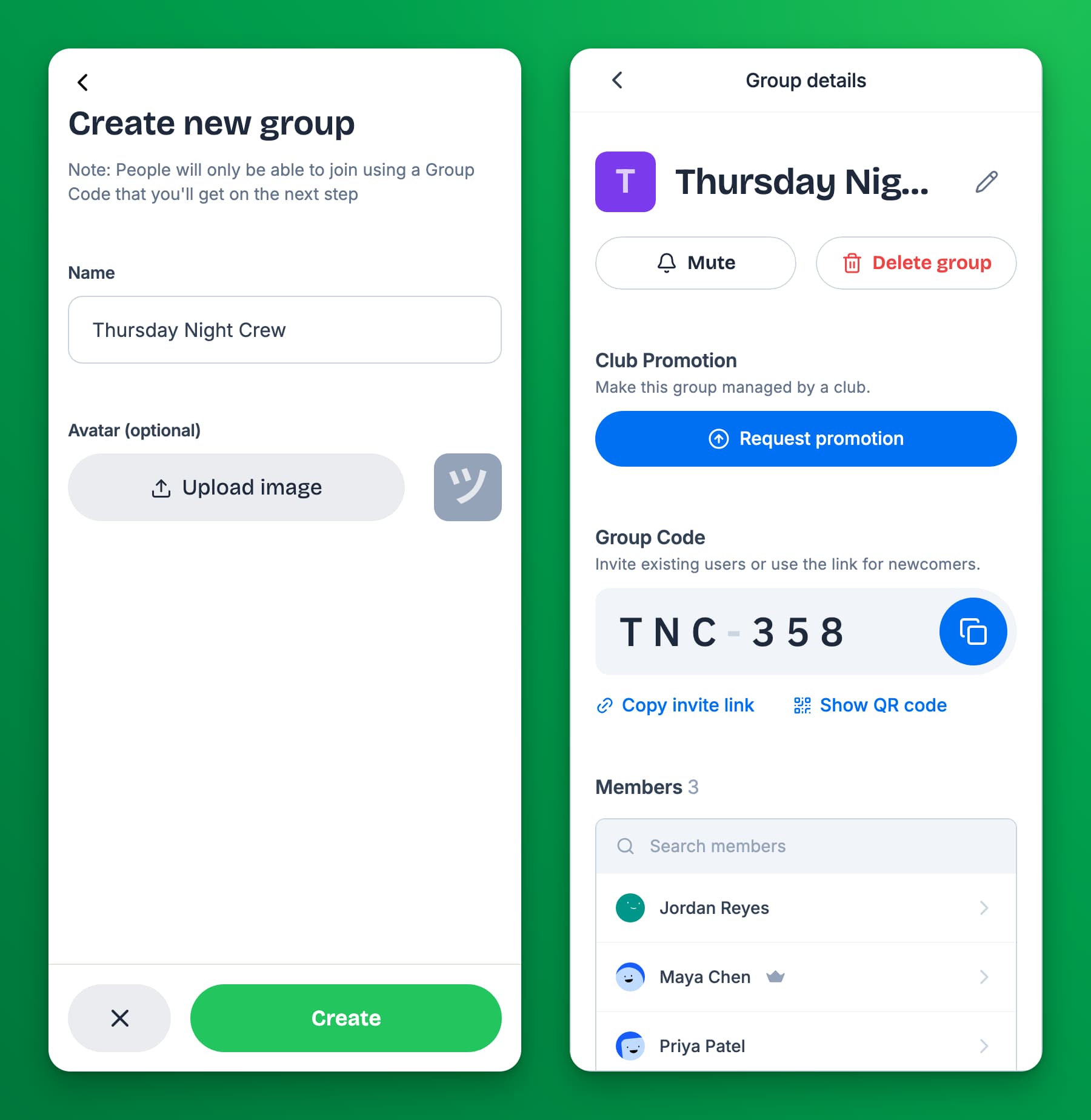
- Enter a Name.
- Optional: tap Upload image to add a group picture.
- Tap Create. The group's chat opens.
Your group is private. People join only with its code, invite link, or QR code. You are the group's admin.
Invite people
- In the group's chat, tap the settings icon at the top right. Group details opens.
- Under Group Code, choose how to share:
- Tap the copy button next to the code, and send the code.
- Tap Copy invite link, and send the link.
- Tap Show QR code, and let the other person scan it.
New people join from Join with code, or by opening the link. See Find and join a group.
Manage your group
You do these from Group details:
- Rename it or change the picture: tap the pencil icon next to the name, make your changes, and tap Save.
- Remove someone: tap the person under Members, then Remove from group. They can rejoin with the code.
- Block someone from the group: tap the person, then Block from group. They cannot rejoin. To undo it, tap them in the Blocked list below Members. Choose Unblock and add back to put them back in the group, or Unblock from group to let them rejoin on their own.
- Delete the group: tap Delete group, then Delete group again. This deletes the group and all its messages for everyone. You cannot undo it.
As the admin, you cannot leave your own group. You can mute it or delete it.
Ask your club to take over your group
If your group should be an official club group, you can send your club a request. When the club approves, the club manages the group, and it can make the group open to all its customers.
- In Group details, find Club Promotion.
- Tap Request promotion.
- If you belong to more than one club, choose the club under Send request to.
- Tap Send request.
While you wait, Club Promotion shows Request pending. Tap Cancel next to it to take the request back.
If the club says no, you see Your previous request was declined, with the club's reason if it gave one. You can tap Request again later.
If something goes wrong
- "Failed to create group" — check your connection and try again. If it keeps failing, open your club's home page in the app once, then try again.
- I do not see Club Promotion. Only the group's admin, the person who created it, sees it.
- People cannot find my group. Your group is private. Send them the code or invite link.
Related
Chat in a group
Send messages and photos in a group, react with an emoji, mention people, delete your own messages, and share events with the group.
Message someone directly and block people
Send a private message to another player, block someone from messaging you, unblock them, and delete a conversation.