

Freeze a membership
Pause a member's billing and benefits while they are away, then resume the membership without cancelling it or charging a new initiation fee.
Pause a membership while a member is away, and keep their spot. You don't cancel the membership, and they don't pay the initiation fee again when they come back. (About 1 minute. The member needs an active membership.)
What a freeze does
While a membership is frozen:
- Billing pauses. The member is not charged.
- Benefits pause. The member loses the membership's rule set, such as member pricing and booking windows, and can't use its booking passes. They keep the passes; they can use them again after the freeze.
- Family members pause too. On a family membership, everyone on the membership is frozen with it.
When the membership resumes, the next billing date moves out by each full day it was frozen, so the member keeps the time they already paid for. On a fixed-term plan, the end date moves out instead. This is Automatic, and it is the default. You can set a custom date instead (see below).
When to freeze a membership
- The member is traveling or injured for a few weeks or months.
- Your club has a waitlist, and the member wants to keep their spot.
- The member wants to stop paying for a while without cancelling.
Freeze a membership
- Go to Users, open the member's profile, and click the Membership tab.
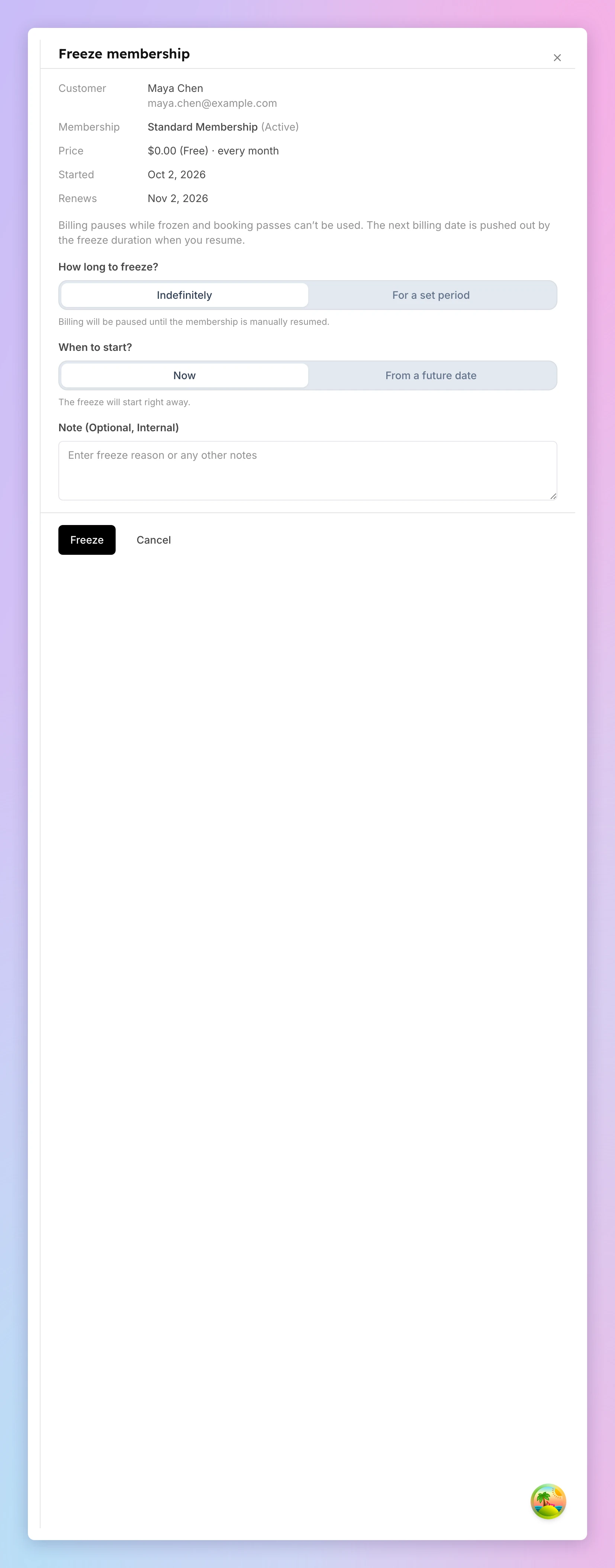
- On the Current Membership card, click Freeze. The Freeze membership panel opens.
- Under How long to freeze?, choose:
- Indefinitely — billing stays paused until you resume the membership.
- For a set period — pick a Return date. The membership resumes on that date by itself.
- Under When to start?, choose:
- Now — the freeze starts right away.
- From a future date — pick a Start Date. The freeze starts at midnight in your club's time zone.
- Check the Next billing date card (Membership end date on a fixed-term plan). It shows the date the member is billed next, marked Automatic: the current billing date plus each full day frozen.
- (Optional, set period only) To bill on a different date, tick Set a custom billing date instead and pick the date. It must be on or after the return date and the current billing date. If you pick a date earlier than the automatic one, the card warns you how many paid days the member loses.
- (Optional) Add a Note (Optional, Internal), such as the reason. Only staff see it.
- Click Freeze, or Schedule freeze for a future start.
The card now shows Frozen, Frozen until, the Next billing date with an Automatic or Custom badge, and Membership frozen. If a custom date bills the member before their paid time runs out, the badge turns amber and shows how many days early, for example Custom · 30 days early. An indefinite freeze shows Frozen until: Manual resume, and its billing date is Set when the freeze ends.
A freeze that starts later shows Freeze scheduled on the card. Click Edit freeze to change its dates, or Cancel scheduled freeze to remove it.
See a freeze
Open the member's Membership tab and click Manage freeze. The Freeze details panel shows Frozen since, the Scheduled return, the note, and the Next billing date after the scheduled return, marked Automatic or Custom. Nothing on this panel changes the freeze.
If a custom date bills the member before their paid time runs out, the panel warns you how many days early it is. To fix it, click Use automatic date…, check the old and new dates in the confirmation, and click Use with the new date. The member stays frozen, and the billing date moves to the automatic one. To keep the date, click Keep custom date.
A membership moved from your previous system can have a custom date that has already passed. The panel then says the member is billed on the day the freeze ends. That was the rule in your previous system, so nothing needs fixing.
Change a freeze without resuming it
Use this to extend a freeze, to end it on a different date, to change the billing date, or to update the note. The member stays frozen, and the days they were already frozen still count.
- Open the member's Membership tab and click Manage freeze.
- On the Freeze details panel, click Edit freeze. The Edit active freeze panel opens.
- Change the Return date, switch between Indefinitely and For a set period, or edit the note.
- Check the Next billing date card, as when you froze the membership.
- Click Save freeze changes.
If another staff member changed the same freeze while you had it open, you see a message to reload. Reload and make your change again.
A freeze that was already indefinite and stays indefinite keeps its saved billing date when you save. You choose the billing date when you end the freeze.
Resume a frozen membership
A freeze for a set period resumes by itself on its return date. To resume a membership early, or to end an indefinite freeze:
- Open the member's Membership tab and click Manage freeze.
- On the Freeze details panel, click End freeze now…. A confirmation opens: End the freeze today?
- Check the Next billing date if ended today. Automatic adds each full day frozen until now to the current billing date. If the freeze has a saved custom date, that date is shown instead.
- (Optional) To bill on a different date, click Change, tick Set a custom billing date instead, and pick the date. Untick it to use Automatic instead.
- Click End freeze. To leave the member frozen, click Keep frozen.
Billing and booking passes come back immediately. Family members get their access back automatically.
Good to know
- Only full days count. A freeze of 9 days and 20 hours moves the billing date by 9 days.
- A custom date stays even if the freeze ends early. If you resume early, the member is still billed on the custom date. In the End the freeze today? confirmation, click Change and untick the custom date if you want the earlier date.
- A scheduled plan change survives a freeze. If the member has a change from Change Membership waiting, it still happens after you resume.
- You can't freeze a membership with a cancellation you scheduled. Remove the cancellation with Restore renewal first.
If something goes wrong
- You don't see Freeze — the membership is not active, it already has a freeze scheduled, or you scheduled it to cancel. A scheduled freeze shows Freeze scheduled with Edit freeze.
- The billing date you want is refused — a custom date must be on or after the return date and the current billing date, never earlier.
- "This freeze was changed by another admin" — someone saved the same freeze while you had it open. Reload the page and make your change again.
- A family member says they lost access — the membership they share is frozen. Resume it to restore access for the whole family.
Related
Club Credit
Club Credit lets customers store value in their OpenCourt account and use that balance to pay for almost anything at the club — from court bookings and event registrations to POS purchases in the pro shop.
Creating and managing a family account
Create a family for a customer, add family members with or without their own login, and see every family at your club.