

Create a dollar-amount pass
Give members a money balance, such as $165 of court time a month. Each booking takes its real price from the balance, so a $15 court and a $35 social cost what they are worth.
Give members a money balance that pays for their bookings at their real price. A $27.50 court takes $27.50, and a $35 social takes $35. (About 5 minutes. You need a membership to add the pass to, or a customer to grant it to.)
Example: Gold members get $165 to spend on court reservations every month.
When to use a dollar-amount pass
| Your offer | Pass to use |
|---|---|
| A fixed number of bookings, whatever each costs (4 free reservations a month) | Free reservation pass |
| A time budget (5 hours of court time a month) | Free court hours pass |
| A money budget, where peak and off-peak cost different amounts ($165 a month) | A dollar-amount pass — this guide |
A free reservation pass covers a $35 peak booking the same as a $15 off-peak one. A dollar-amount pass charges each booking what it costs.
Before you begin
- You can create booking passes in Booking Passes.
- Decide how members get the money: every cycle with a membership (Step 2), or once, by hand (Step 3). You cannot sell a dollar-amount pass in a pass package.
Step 1: Create the booking pass
-
Go to Booking Passes and open the Booking Passes tab.
-
Click Create Booking Pass (Create Your First Booking Pass if your club has no passes yet).
-
Enter a Name, for example Court Credit. Customers see the name, or the Display Name (Optional) if you enter one.
-
Under Pass Applies To, choose Event for courts and events, or Coach for lessons.
-
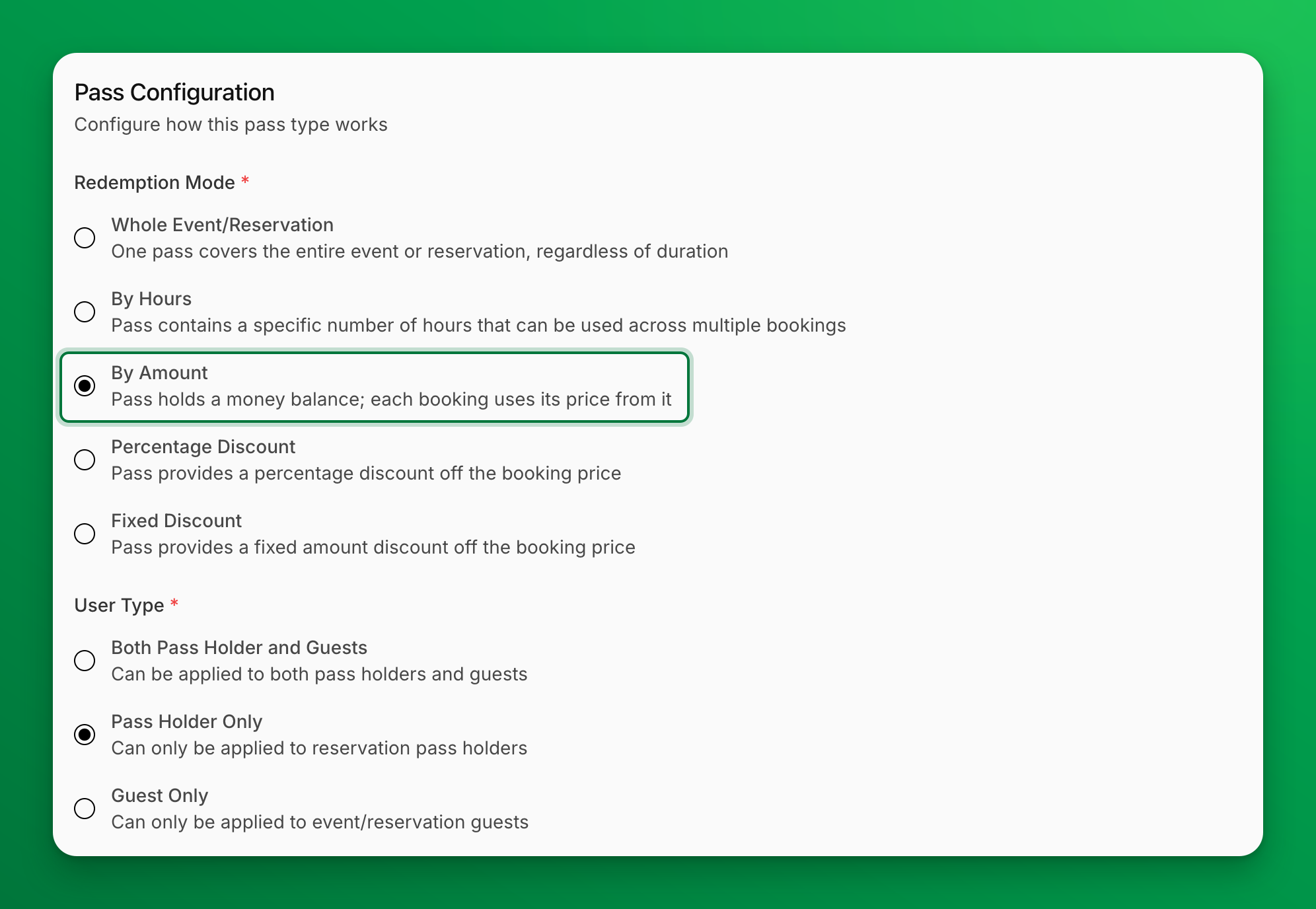
Under Redemption Mode, choose By Amount.
-
Under User Type, choose Pass Holder Only.
-
Optional: to let the member's family spend the same balance, turn on Can be redeemed by family members.
-
Under Event Restrictions, check what the money can pay for. For court time only, check Reservations and leave the event types unchecked.
-
Click Create Booking Pass.
You do not enter the amount here. You set it where you give the pass: on the membership or in the grant.
Step 2: Add the pass to a membership
Members then get a new balance when the membership starts and again every cycle.
-
Go to Memberships → Catalog, open the membership and click Edit.
-
In the Booking passes section, click Add booking pass.
-
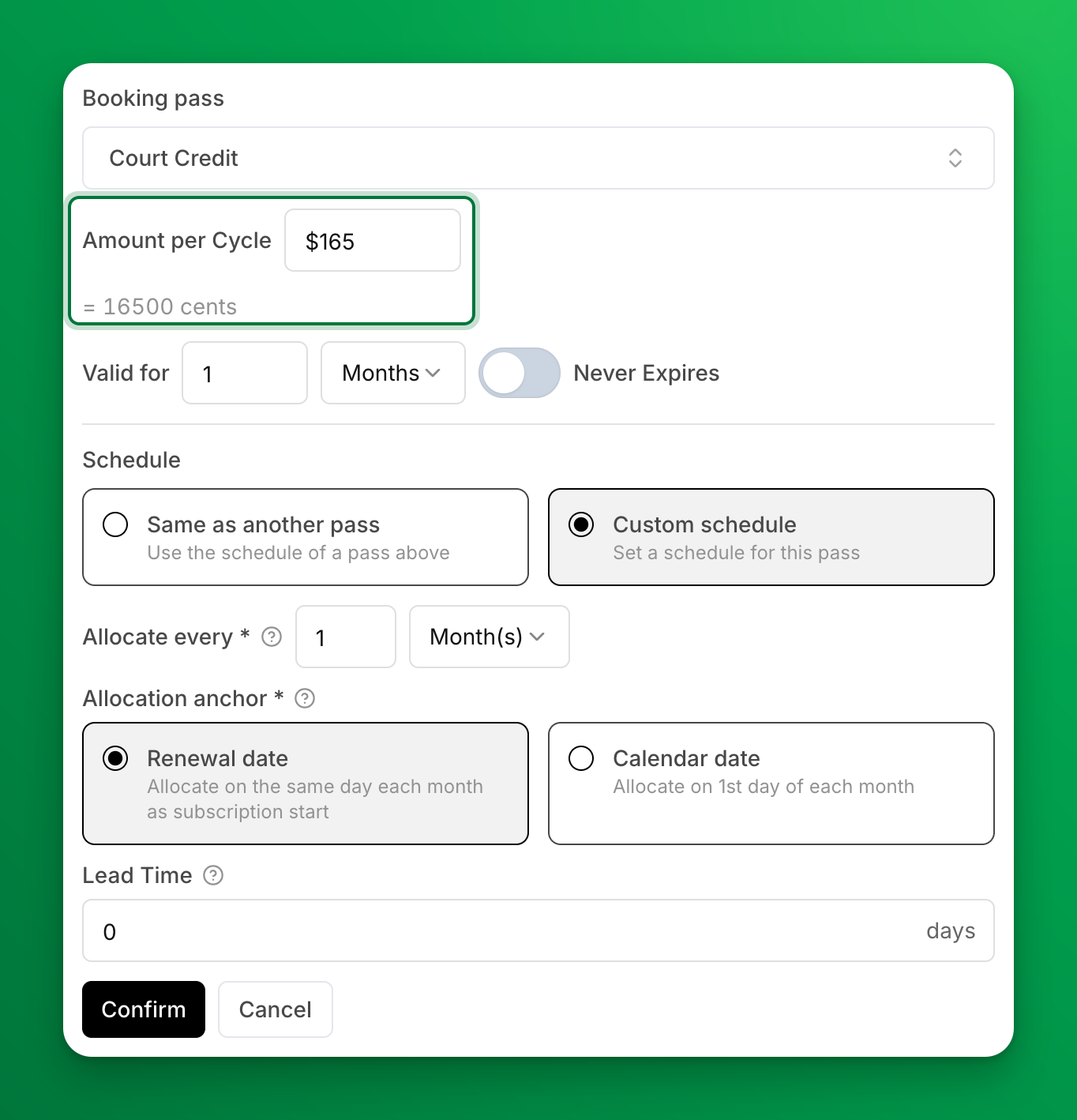
Under Booking pass, pick the pass you created in Step 1.
-
Enter the Amount per Cycle in your club's currency, for example 165. The line under the field shows the same amount in cents. It must be above $0.00.
-
Set Valid for to 1 Months.
-
Set Allocate every to 1 Month(s) and choose an Allocation anchor: Renewal date or Calendar date. If the membership already has a pass, first choose Custom schedule under Schedule, or choose Same as another pass to use that pass's schedule.
-
Turn on Never Expires only if unused money should carry over. The note under the fields then shows how much a member who spends nothing holds after a year.
-
Click Confirm, then Save Changes. If the membership already has members, choose New subscribers only or Apply to all subscribers, then click Confirm and Save.
For every field on the pass row, see Give booking passes with a membership.
Step 3 (optional): Give a balance by hand
To give one customer a balance, for example as a comp, open their profile, go to the Booking Passes tab and click Grant Booking Passes. Pick the pass and enter the Amount. To give it to many customers at once, use Booking Passes → Pass Holders → Grant New Pass. See Grant booking passes by hand.
How it works for members
- A Gold member starts the month with $165.00.
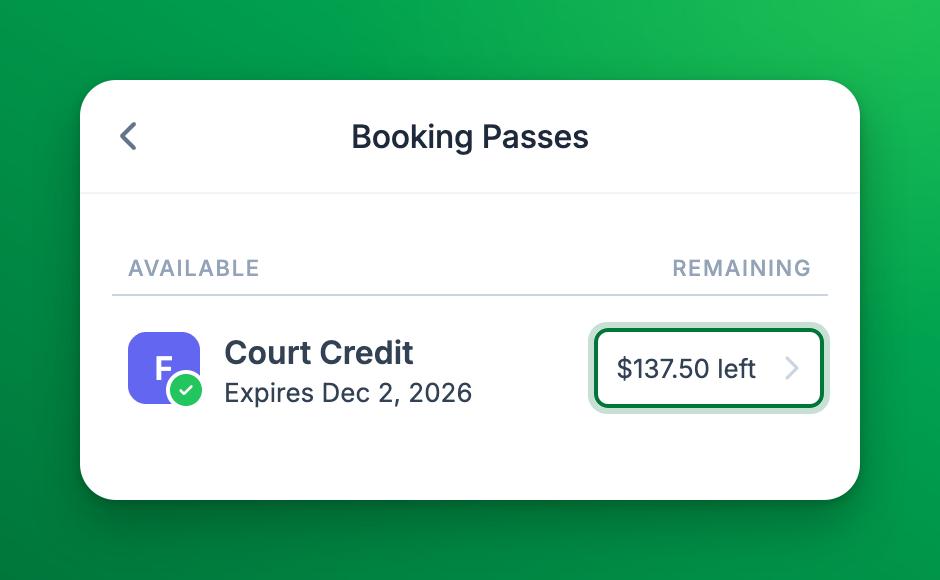
- They book a $27.50 court. The pass pays it, and $137.50 is left.
- They book a $35.00 court at peak time. $102.50 is left.
- When the balance is lower than the price, the pass pays what is left and the member pays the rest by card. Tax applies only to the part the member pays.
- Next cycle, they get a new $165.00 pass.
Members see what is left at checkout and in My Profile → Booking Passes, for example $137.50 left.
Staff use the pass the same way when they take payment for a booking.
What happens when a booking is canceled or moved
- Canceled with a refund: the money the pass paid goes back to the pass.
- Moved to a cheaper time: the difference goes back to the pass, if a cancel at that moment would still give a refund. If the move is past your refund cutoff, the move review says the money is not returned.
- Moved to a more expensive time: the pass does not pay more. The member pays the difference.
When staff move a booking past the refund cutoff, the review asks What happens to the $… of pass? Choose Keep it (the default: the pass amount stays used) or Return to the pass. You see this choice only with the Waive Reschedule Charges & Refunds permission. See Move a booking.
If something goes wrong
- You edit an existing pass, and By Amount is grayed out with "By Amount cannot be chosen". A membership, a pass package or an allocation rule already uses this pass. Create a new pass instead.
- "Enter an amount above $0.00". The amount on the membership or the grant is empty or zero. Enter the money the pass holds.
- The pass is not in a pass package's list. Dollar-amount passes cannot be sold in packages. Add the pass to a membership, or grant it by hand.
- The pass is not offered at checkout. The booking is outside the pass's Event Restrictions or time restrictions, the balance is $0.00, or the pass expired. Check the pass on the customer's Booking Passes tab.
Related
Creating a Free Court Hours Pass
Give your members a pool of free court hours per month. Instead of counting individual bookings, the pass tracks total time — each reservation deducts its duration from the pool.
Create a Free Event Pass
Give your members a set number of free event entries per week/month. Each time a member joins a qualifying event, one pass is consumed and the fee is waived.